Sunday, November 7, 2021

Tackling Arduino Code - Not Winning . . . . . Yet


This week started a new adventure with a Makerspace class for graduate school.  Before we got our syllabus for the class, I was excited; I have heard of schools with Makerspaces and was eager to learn more.  Admittedly when I read the the syllabus. learned I needed to order an Arduino kit and begin coding it, I was more apprehensive than excited.  I have done a little bit of html coding for a part-time job I had, but that was nearly 20 years ago.  But, I rarely give up on a challenge, so I put my big girl pants on, and got to work once the beginner kit came in.


I used the book's instructions, thought I had done everything right.  It didn't seem too difficult, but low and behold I failed.  My light did not blink.  Our assignment was to create a circuit that would make an LED light blink.  It was supposed to be a beginner circuit.  Guess, I'm pre-beginner.  

Thankfully, I felt comfortable admitting my failure on our class discussion board.  My encouraging classmates gave me some great tips, and after further investigation, I realized I had put the breadboard on upside down.  Even bifocals didn't help me with the those tiny numbers and letters.  


I couldn't get the breadboard off, so I took the Arduino board off and turned it around.  I tried the tips from classmates and even copied and pasted the code after I had typed it in myself; it still did not work.  

I was getting a little frustrated, and had to take a break.  Actually a long break, I was scheduled to visit my son in Lubbock and the Arduino had to stay home.  On my trip, I did a little more reading, and found a simpler set-up for a blinking light.  I also reached out to some friends who I thought could help me.  


As I reflect on this experience and how, not only did I not have success with my first maker project, but I am also not able to have all of the required components of this blog post, and I find that uncomfortable as a way to start the class.  I am writing this blog post from the airplane, so I don't  have the ability to create the video that should be a part of this post.

I don't believe there is anything wrong with my code.  I believe it has to do with the connections.  When I continue working on this Monday, I will also use a magnifying glass to make sure I am putting everything together correctly.  I do feel that I am handling this the way I would want me students to.  I am not giving up.  I have reached out to my network and accessed resources.  I have taken control of my own learning.  This is exactly the mindset I would like my students to have.  I don't mind if they collaborate with friends (or Google), as long as they are seeking help, and not just copying.  

I am looking forward to getting my circuit to work and exploring other circuits.  I believe I can make this happen and have a few resources to help me out if I get stuck. 

Wednesday, August 11, 2021

Web 2.0 Tools: Summing it All Up


​​Over the past five weeks, we have explored Web 2.0 tools and their use in education.  While the concept of Web 2.0 was not new for me, I was presented with some new information and things to think about.  The most helpful piece for me was developing an evaluation rubric.  This made me stop and think about what would be important in choosing a tool for educators.  What I learned from this Web 2.0 exploration, is that sometimes the least "fancy" tools are actually the best to foster student-centered instruction.  When used correctly in the classroom, these tools enable our learners to better understand the process of learning, as well as gain a deeper understanding of the material.  These tools enable teachers to let the students create, communicate, and collaborate on a digital format - which is what a lot of students are already doing; this makes the learning more relevant. 

The pitfalls to Web 2.0 tools is they can be over and/or underused.  Sometimes educators want to substitute the technology for good quality instruction, which is not best instructional practice.  The technology you choose should enhance the learning experience for your students.  Through this class, I realized the importance of teaching our students how to use these tools and exposing them to the real world use of technology.  


Another thing I don’t often look at,  but need to consider when evaluating technology tools for educators is cost.  It is frustrating for a teacher to have a new tool ready to use and then find out the best features cost money.  The cost-factor is one of the reasons I like the Google Platform; students are able to use Google Docs, Slides, Sheets, Drawing, Jamboard and drive at no additional cost to the student or teacher.  Now, there are features within the Google Workspace for Education that cost money, but these costs are not related to the use of the main Google tools.


The work we have done in ETEC 527  reinforces my educational philosophy that the pedagogy should come before the tool. If we want our students to use technology tools in a way that maximizes student learning outcomes, we, as educators,  need to plan purposefully in our instructional design.  In addition, this class has reiterated the importance of staying up to date with technology.   Many of the technologies from five or ten years ago are not current and usable today.  By having a growth mindset towards education and the use of technology, we are modeling a culture of growth within our schools and our classrooms.

Tuesday, August 10, 2021

Vanity Search: Take 2


In the second round of my vanity search for ETEC 527, I simply searched Lisa Pogue, Royse City.  The results from this search were all me - and all related to me professionally, except for the dreaded people searches - (dreaded if someone is looking for me, but not so dreaded if I am trying to find someone, teehee).  There was one concerning entry and I truly have no idea how it got there.  I tried to do some investigating, but I'm not even sure what it is.  If anyone knows . . . well help a girl out.  I hope it is nothing to worry about, but I will continue to see if I can figure it out.

As I clicked to the second page, there was one post for Lisa Pogue, the mortgage broker, while the other posts containing much information continue to be from my professional life.  Scroll on over to the third page and the most surprising website showed up.  There is a website, where you can go look up people's yearly salaries if they are government employees!!  WHAT?  That should not be okay, but it's public record and the internet, so . . . . I guess it is.  

Overall,  I'm still pleased with my digital footprint,  any private information that I can control is private and the majority of the information you will find relates to me as a professional educator.  And guess what?  I'm okay with that.  It's who I have been for the last 29 years.  I'm not too pleased with some of the personal information out there that I didn't choose to be out there, but what am I to do?  From these vanity searches, I've learned it's probably a good idea to check your "google" every once in awhile to make sure there isn't anything out there too surprising. It’s nice to know what others will find if they search for you.


Sunday, August 8, 2021

Hyperdocs: An adventure or a deadend


Our adventure this week was in Hyperdocs, a topic that I felt pretty confident with after the last year and a half of preparing teachers for virtual lessons.  As our Instructional Team planned to help our teachers, we realized that Hyperdocs would be a great way to deliver content and provide a workspace while students were online.  We began digging in and providing training.  It turned out to be more difficult than we expected.

As noted in our reading, a common misconception is that a Hyperdoc is simply a glorified document with links or a virtual worksheet.   When teachers attempt to make a Hyperdoc the very thing it wasn't designed to be, it takes away the power of this learning platform.

After diving into the resources on the Wakelet, I was reminded that just as with all technology integration, an educator must first have an understanding of best practices in teaching.  If a teacher isn't already considering how their students could communicate, collaborate, critical think, or create, then it is difficult to get them to simply transfer their "sit and get" instructional method to an interactive Hyperdoc.  I was even reminded that we need to really think about what we put in a Hyperdoc when we prepare one for our students.  When I am coaching teachers and we are working on a delivery method such as Hyperdoc, Flipped Instruction, or even PBL, I encourage them to choose one unit and really work on the method to make it strong - in lieu of trying to make every lesson a Hyperdoc (when given a choice in a non-pandemic world, of course).  

During quarantine teaching we found that Hyperdocs can also create some roadblocks and/or even deadends depending on the teacher's mentality.  If the Hyperdoc was lengthy or had a lot of different things for the students to create that were linked to other things, then it became difficult to grade.  My recommendation  is to use the Hyperdoc to give students options and only have one or two graded parts.  Let the activities in the lesson focus on the process of learning and not just the written outcomes.  Some of our more successful teachers used Google Docs or Google Slides uploaded to Google Classroom and then pushed out a copy to all of the students.  Each student had their own copy and ALL work was done in the doc for ease of grading.  My first choice for creating Hyperdocs is Google Slides because you can embed videos rather than simply link them.  I have found the more I can keep them in the original doc, then the more likely they are to not miss part of the assignment.

I liked the padlet resource that was provided on our Wakelet assignment because it had a lot of options in one place.  Even though Wakelet isn't my favorite tool, the fact that it was designed with some interaction by having us go out to Twitter and respond to what we learned made the activity more engaging.  It was more of a curation of materials, but the social media aspect created the interaction with other students.  This interaction could have been increased by having us share links to our hyperdocs and respond to each other.  


This week, I have seen some pretty fancy Hyperdocs and I think it is important to remember that "pretty" doesn't mean effective.  Be sure you are focusing on learning objectives and outcomes.  Another tip is to train your students how to use them.  Don't assume the navigation will be intuitive.  Hyperdocs are a powerful tool when planned for and used effectively.


Saturday, July 31, 2021

YouTube: From Consumer to Creator


This week as a class, we are exploring YouTube.  YouTube is one of those platforms that when it first "hit the web,"  I just didn't get it.  Of course that was sixteen years ago. I was a mom of a five year old and a three year old working part-time as an educational consultant, and spending the rest of my time trying to figure out how to balance this adulting life.  Who had time for watching videos on the internet, especially with a dial-up account in a rural area? At the time, I simply used my internet for email and work related documents.  I had no idea just how powerful this platform would become, nor how much I would use it.

Fast forward two years, my son started school, and I had an opportunity to return to the classroom part-time as a Gifted and Talented specialist.  By this time more educators were using YouTube in the classroom as a way to extend the curriculum.  Of course, this was perfect for the GT classroom where we wrote our own curriculum.  Not only did I begin using YouTube content in my classroom, but I also began uploading student work on unlisted playlists for families to view.  For several years, that was the extent of my YouTube use in the classroom and in my personal life.  

As my children got older, they became consumers of YouTube.  My daughter started following a channel to learn about cute hairstyles, my son watched it to learn video gaming tips, my husband started using it for "fix-it" videos, and my niece started creating and uploading content.  I couldn't get away from it.  

Clearly YouTube was here to stay.  In February 2021, Christina Newberry gathered the following YouTube stats:

  • It is the second most visited website on the internet.
  • Coming in behind Facebook, it is the second-most used social platform.
  • More than one  billion hours of YouTube videos are watched daily.
  • Viewers over the age of 18 spend an average of 41.9. minutes daily on YouTube.
My Channel
So yea, whether I "got" YouTube or not, it has clearly found its niche in the world, and low and behold I'm not only a YouTube consumer, but a creator.  I began by creating content for my students.  My English I Team and I found that some lessons were best delivered in a way that students could pause and rewatch, or even fast-forward.  When I became an Instructional Design Coach in 2019, I began creating videos for my staff to have on-demand.  I also became more purposeful in curating content using playlists and subscribing to channels that I found useful.  As you all know, my first year as an IDC ended with the beginning of the pandemic, and our learning technologies team began creating videos at a super-sonic, at least that's how it felt, speed for the staff of our entire district.

This week I was challenged to create playlists for using Twitter, Teaching and Learning with Technology, Web 2.0 Tools for technology, and playlists geared towards my content.   These were topics that I hadn't gathered content on, and I do think the videos I found will be helpful. I also created a playlist for videos specifically dedicated to Instructional Coaching.  

While I didn't "get" YouTube 15 years ago, I now believe it is one of the most powerful platforms on the internet.  From this one site, not only have I learned a ton about teaching, learning, and technology, I have also learned strategies for managing a home suffering from the trauma of substance abuse disorder, workouts for more "mature" women, meals to cook for my newly diagnosed diabetic husband, recipes for my husband to try out on the grill, and even saved money with all of the things around "the ranch" my husband has been able to repair by watching YouTube videos.  

When using YouTube for educational purposes, it is important for teachers to pre-watch any videos they will share with their class, as well as learn to post the videos safely and without ads.  We should also facilitate discussions with our students about the smart use of this video-sharing platform.

My Niece's Channel
To end this not so little blog post on YouTube . . .  remember my niece who began creating content when she was around 7 or 8? Well, she's currently 19 and somewhat "YouTube Famous."  While I don't quite understand why people want to watch "A Day In the Life" or "Get Ready with Me," it has enabled Savannah to follow her dreams, make a respectable income, and set new goals.  She taught herself how to shoot video, edit, market herself, and more (most likely self-taught through YouTube).  As educators we are encouraged to get our students communicating, collaborating, critical thinking, and creating.  Simply looking at my niece's "Savway" brand, I can see the the unlimited opportunities we are providing when we plan for learning experiences that include the 4Cs -  unlimited opportunities for their future, a future that my lifetime has shown we can't even begin to predict.  


“25 YouTube Statistics That May Surprise You: 2021 Edition.” Social Media Marketing & Management Dashboard, 3 Feb. 2021, blog.hootsuite.com/youtube-stats-marketers/.


Saturday, July 24, 2021

Reconnecting with Twitter

If I remember correctly, I signed up for my first Twitter account eight years ago.  I was introduced to Twitter through a co-worker, soon to be new principal.  He was definitely a "twitter groupie" and led me to believe Twitter was the best thing since sliced bread.  Honestly, at first, I didn't quite understand it, perhaps because I am such a chatterbox, the limitations on characters was difficult for me to comprehend.  Overtime I did learn to tweet, use hashtags, participate in twitterchats and more.  It also became easier to condense my thoughts into 140, now 280, characters.  I began to see the value of the platform, but I honestly didn't love it.

Fast forward to my current position as an Instructional Design Coach, and I want to affirm my teachers and share the success through Twitter, but it's not that easy.  You might be wondering why I continue to use it if I don't love it.  The basic answer is our school district uses it and our superintendent stresses the importance of telling our story.   I do agree with his philosophy that if we aren't going to share the wonderful things public educators are doing, then who will, so I continue to put forth effort.  If I tweet and use our district hashtag, then others are more likely to see it and retweet it for more amplification opportunities.

To reach my goal of affirming my teachers through Twitter, I literally add "tweet" to my weekly To Do List; one quarter I even used a habit tracker to help me reach a professional goal of 3-5 tweets per week.  I didn't always reach it, but my preacher suggests we set a goal of reading our Bibles 7 days a week and be proud if we got to 5.  This is how I feel with my tweeting goal.   Any tweets are more tweets than I would have done previously.

This header is compiled of actual decor I have in my office.

In graduate school this week, I was assigned a Twitter Adventure, and thus Twitter and I were forced to reconnect on a deeper level.  My professor helped me remember some of the features I  had only minimally explored and/or didn't use to the fullest - hashtag searches, lists, and outside apps such as Hootsuite and Tweetdeck.  I especially appreciated the site with all of the education hashtags and chats.  Through a few hashtag searches I found some helpful articles on instructional coaching, as well as some new people to follow.  As a Google Certified Trainer, I especially liked this article that I found through the hashtag #ETCoaches.  I'm currently working on planning professional learning for when teachers return to campus, so this was timely information.

While I didn't learn much about Twitter that I didn't already know, I did have the opportunity to play and explore, which reminded me of the power of sharing your voice through Web 2.0.  As I was exploring, I started to get some ideas of how I could use Twitter more effectively this school year as a way to engage my staff and amplify not only the coaching program, but their individual contributions to the students at Royse City High School.  We currently have a district hashtag, but I would also like to have a Royse City High School, or RCHS, hashtag for my teachers and to make accessing our tweets more easily.  I wasn't aware that I could share a Twitter list with others, so I could also make a Twitter List of staff members on Twitter to share with everyone.  

One of my main goals as the IDC is to help more students at RCHS have opportunities to communicate.  Through this week's exploration, I realized I could use some communication and engagement strategies with my educators that would hopefully encourage them to try more with their students - tweeting some educator polls, Twitter challenges, and possibly even a modified Twitter Chat for my teachers.  By modified, I am thinking maybe a question a week that teachers can respond to, sharing some of their great ideas and pictures of their successes in action.  Just as I am not a Twitter expert or even a frequent user, I know that not all of my teachers will participate, but perhaps we could create some ripples in our school with those that do.  When I was in the classroom, I used multiple ways to reach my students, Remind, Twitter, Weekly Email Newsletter, and Google Classroom.  I need to remember this same mentality with the educators and administration at RCHS and RCISD.

I appreciate the opportunity to reconnect with an old "friend acquaintance," and learn more about my classmates through their tweets.  Thank you, Dr. B, for challenging me to expand my ideas through our Twitter Adventure.  


Wednesday, July 14, 2021

Musings on my Digital Footprint

Despite the fact that I enjoy writing, it's been awhile since I've written a blog post.  During my second year as an Instructional Design Coach, I decided to pursue a second Masters Degree in Educational Technology Leadership.  My next few posts will be in response to a class in Web 2.0 Technologies at Texas A&M University - Commerce.  

Our professor asked us to do a "Vanity Search" to learn more about our digital footprint, or online presence.  As a professional educator, I like to think I am  careful about what image I create on the "interwebs," as one of my favorite Tik Tokers calls it, yet I was still a little nervous to begin the "Google Search" of myself. 

I began my search with the name I most commonly go by, Lisa Pogue.  On the first page of the search, I found my professional educator Linked In profile and my @RCHS_Pogue twitter account.  I learned there are several other Lisa Pogues, one of which has a large online presence with her business, DC Lending.  Her information was more prominent than mine.  Under images and videos, all but one of the images were from my professional Twitter account, and then there was an image of my daughter where my name was mentioned in a senior spotlight article.  

So far so good on the Google Search, but everyone knows there are other pages to "the Google."  On the second page of the search for myself, I found a link to my Goodreads profile, my YouTube channel with my most recent video from the first summer session class.  In addition there was a link to the Show Me account I used when I was an elementary GT specialist 7 years ago, as well as my Donors Choose Account.  Once again, the majority of the links were for Lisa Pogue with DC Lending, so I refined my search to "Lisa Jobson Pogue,"  including my maiden name.

This query brought up more links specific to me, and less for Lisa, the mortgage professional.  From this search, I found a link to my Facebook page, specifically to a post about senior yard signs for my daughter's senior class, some of the same links as the previous search, but quite a bit more images.  The images were mostly family photos that were posted on my mom's obituary, some were from my professional Twitter account, and one directory picture from a professional development event.    Under videos, the link to my mom's obituary video came up, as well as where I had signed obituary pages for a cousin and a friend.  

When I added my middle name to the search, Lisa Diane Pogue, or Lisa Diane Jobson Pogue, a few people- search links came up, which was a bit disturbing as they had very accurate information about where I lived and even my phone number.  They also had a few erroneous phone numbers which I have never possessed  This search also led to a page in my UT Alumni directory published in 2001 and a recent lawsuit filed against me in regards to a wreck my daughter had in 2018. (For the inquiring minds, this lawsuit was settled after they put my 18 year old daughter through a deposition for a wreck she had at the age of 16 but I digress  . . .)
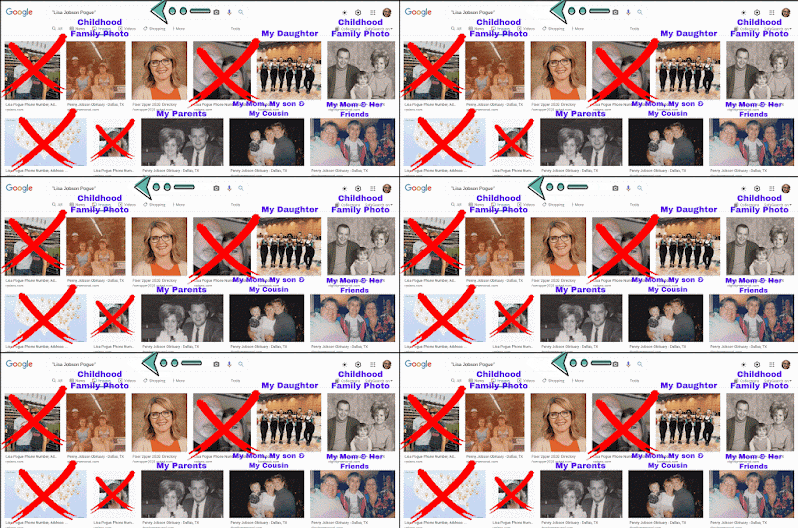


For grins, I also did a search for my previous married name, Lisa Chapa, Lisa Jobson Chapa, and Lisa Diane Chapa.  Being as I was married from 1990 - 1996, long before "the Googles" were popular, there wasn't much to be found.  There was a link to a fastpeople search engine, but linked to me, Lisa Pogue.  In addition, there was also a well-respected medical professional named, Lisa Chapa, who has a respectful digital footprint about her work as an oncologist - nice!

Reflecting on my Vanity Search, I am pleased with my digital footprint and how it would lead people not only to positive information about me, but more importantly about my professionalism as an educator.  It  confirmed that most of my social media accounts are private, and therefore do no not come up in search engine results.   Mostly, it made me consider the fact that I didn't grow up with the internet, social media, or cell phones, so it might be easier for me to consider the ramifications of a negative online presence or a spur- of-the-moment post made in anger that could remain forever, and I wonder if my own children will be able to say the same about their digital footprint when they are 52 years young :).  As a "more-mature" user of the internet, and at the risk of sounding like an "official old-person,"  I do worry about the next generation and the fall out of their tendency to put their private lives out for all of the world to see.  I worry about how decisions made by youth, before their brains are fully developed, will follow them into their future careers, and then again I wonder, by then, will it even matter?  As much has changed in my lifetime and even in my children's lifetime, will the next generation's ideas of a positive digital footprint be different than mine today?